Warpbound
View GitHub RepositoryRole: Game Designer and Developer
Warpbound is a solo project built on the in-house Hornet engine, where I developed key systems—including a modular HUD, GUI shop system, and efficient spritesheet animator.
Team Size: 1
Time Spent on Project: 3 months
Mark Awarded: 85/100
My Contributions:
- Designed and implemented a spritesheet animator component to efficiently animate spritesheets
- Built a GUI Shop System using polymorphism, making it easy to add new items and extend functionality in the future
- Developed a vertical-hierarchy HUD system, cleanly separating display from gameplay logic for maintainability and scalability
- Extended the Hornet engine’s core classes, adding new functionality to the audio and graphics systems
Introduction
Class Diagram
Warpbound was a fun and challenging solo project, where I improved my architecture and object-oriented programming skills. One of my favorite features to build was the spritesheet animator - I focused on making it efficient and flexible so it could seamlessly integrate with the existing systems of Hornet.
The planet assets I sourced were provided as spritesheets, but Hornet's built-in animator expected individual image files for each frame. Animating at 60fps, even for a short animation, would've meant thousands of individual files, not to mention the cost of loading them onto SDL surfaces. To solve this, I created a dedicated animator component that hooks directly into game objects, allowing them to be animated with a single instance.
While I enjoyed working solo and learned a lot from the process, I've found that I prefer working in a team. Working with others brings different perspectives and approaches that often improve the final result, and it also helps me grow my teamwork and communication skills.
Spritesheet Animator Component
Animator.cpp | HtGraphics.cpp Line 93
The Animator component manages all animation timing, looping, caching and deletion, while seamlessly integrating with the GameObject class. Rather than overriding the default render function it feeds the frames back into the object's existing render function, keeping rendering centralised and consistent across all game objects.
Memory efficiency was another key consideration, so I added a frame caching toggle. When enabled, all frames are stored after a single pass over the whole spritesheet, allowing fast access without reprocessing, useful for shorter looping animations. For longer animations, such as the background planets, caching can be disabled to reduce memory usage.
Spritesheets by Deep-Fold
GUI Shop System
Shop.cpp | ShopItem.cpp | Button.cpp
The Shop system acts as the controller for all shop interactions, managing a vector of ShopItem objects, an abstract base class. This design makes use of polymorphism to keep ShopItem management modular and easily expandable, while also handling entering and exiting as well as scene transitions.
To stick to the scope of the project, I prioritised simplicity and fast iteration over a fully-fledged structure, so I deliberately chose a shallow hierarchy. For future expansion, I would consider reworking it into a vertical hierarchy like the HUD system, allowing for more specific behaviours and improved scalability.
HUD System
HUD.cpp & Derived
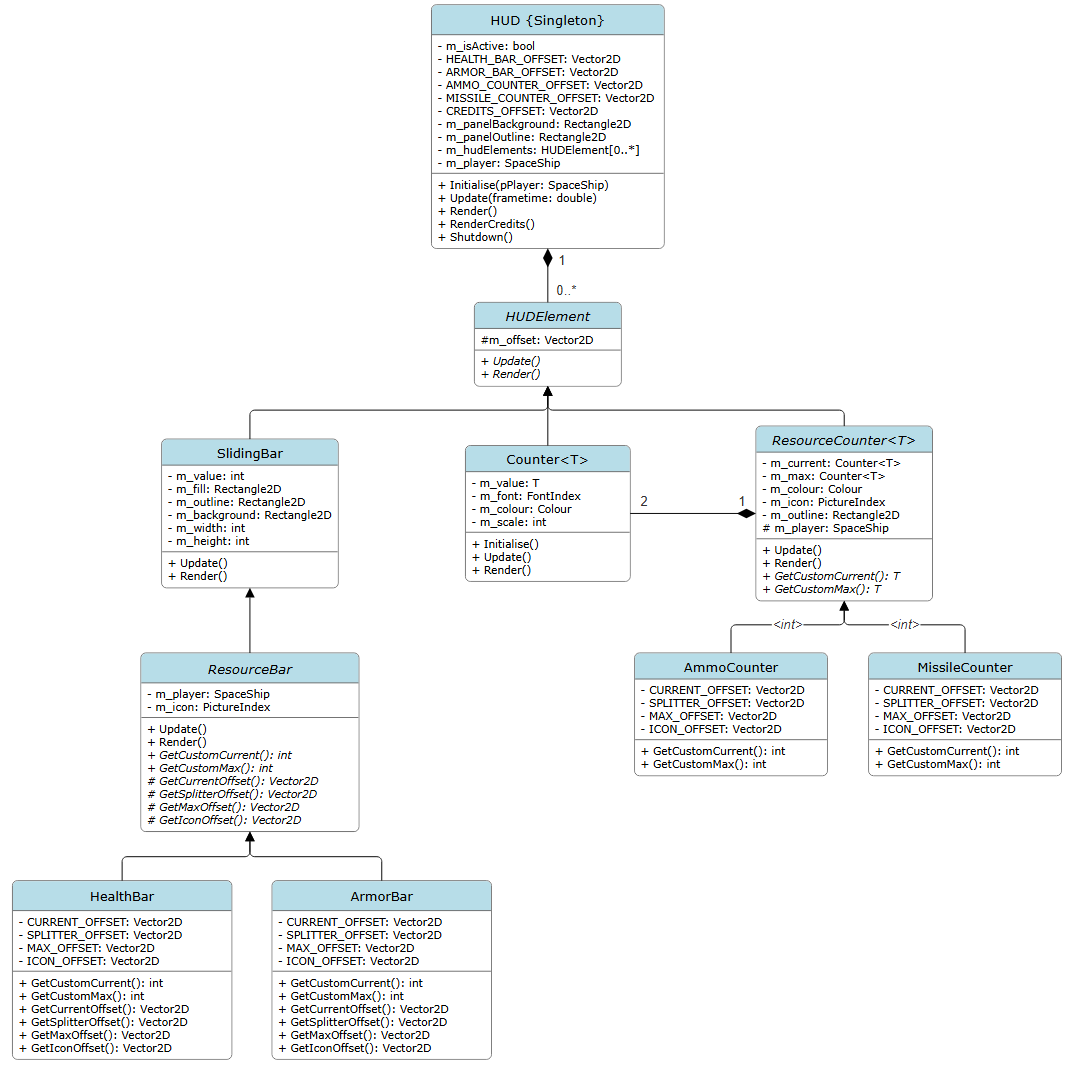
The HUD system is one of the components I'm most proud of in this project. It uses a vertical hierarchy with high cohesion and low coupling, and contains no gameplay logic. Its only responsibility is to receive, format and display data from the player. This separation keeps it reliable and easily scalable.
The HUD acts as a controller for a vector of abstract HUDElement objects, using polymorphism to manage and position them. In the future, I would extend the engine with an event system to completely remove the current weak dependency on the player.